Dec - System Wide Overlays & More
I spent this month working out lower level details, including finalizing the Command Line and various other OS concepts like the overlay system, context menu, explorer, and more.
Dec 1st - Unix Differences
The command line is Unix inspired - I’ve implemented a handful of GNU commands that Linux power users would expect to be here. Commands like cat, grep and other command-line tools. The commands should be familiar, but with some clear differences.
My designs goals for the terminal are simple:
- No hidden magic
- In Unix the shell acts as it’s own mini language, I use Lua for that. This means I can skip variables. I think variables are useful, but they should not be in a shell. Variables should be in a higher level language, like Python (or Lua).
- In my OS, if you pipe commands together, STDOUT pipes directly into your parameters as the last argument to the command. This means commands no longer have to be programmers to work together, if they write to the console, or accept parameters, they will interop without any extra glue.
- Process status codes are another part of the system that is generally hidden from you. Status codes are not shown in the console unless you have a process that is explicitly programmed to show them. Unless the user is a developer, they probably won’t know what a status code is.
- Copy and enhance
- Follow what works, and improve what doesn’t. Consoles in general have been a problem that has been solved for ages now. And honestly, I don’t think there is much I could improve with the console itself. So my efforts should be focused more on the lower level details that normally could not be changed in a modern operating system.
Unix comes from the philosophy of everything being a file, I’m coming from the philosophy of everything being a function. Essentially I want the command line to execute as a programmable lambda function.
This means simplifying the esoteric magic, starting by re-engineering STDIO hiding the output-input communication between processes - and removing the status codes concept. All communication between processes must be in the parameters of the function, allowing the users to naturally learn how a process works.
Take the following command:
echo 10 | awk -v x=5 "{print $1 * x}"
echo returns 10 which is then passed onto the awk command as a parameter at the end.
So the awk commands ends up being awk -v x=5 "{print $1 * x}" "10".
Notice the
10at the end, neatly wrapped in".
I think this simplified approach will let users debug commands slightly easier, as they won’t require any esoteric knowledge going into this. If a command failed, just type the command again, without the last pipe, and review the output.
Coming from Unix - this shouldn’t effect anything in practice. I’ve added ' to maintain backwards compatibility with Unix commands. Unix shell need this escape key because the shell has support for variables, and this is a way of auto escaping those variable names.
Unix shells need a simple way of auto escaping - I was able to avoid that by forcing commands to be explicit with no hidden variable magic - that’s what Lua is for. I’ve added ' to maintain backwards compatibility with Unix commands.
Command line shorthand is not implemented for most commands, so cut -d, -f1 would be cut -d , -f 1. (cut isn’t implemented though, use awk instead). The choice to make commands more verbose is to help ensure the commands are explicit and very obvious when it’s an argument / parameter that can be changed.
The file system pathing is almost identical to Unix - / denotes an absolute path and the root of the file system. \ will be automatically converted to / in most instances. One major difference though, we are case-insensitive, like Windows. Another difference, no ~ support. I was going to add it in, but I decided I want to avoid magic - and other hidden, esoteric shortcuts you’re expected to memorize just to operate the system.
Dec 2nd - Windows Differences
A lot of my OS UX has been designed around Windows, at least the GUI portions. The taskbar, start-menu, desktop and explorer systems have been inspired heavily from Windows. Windows XP was one of the most naturally intuitive user experiences for me - partially because everything was paired together so nicely.
As Windows grew, the feature parity became less and less. The old features were unable to be removed fully, causing bloat. By the time we reached Windows 11, we have 4 different settings menus - all buried one under another.
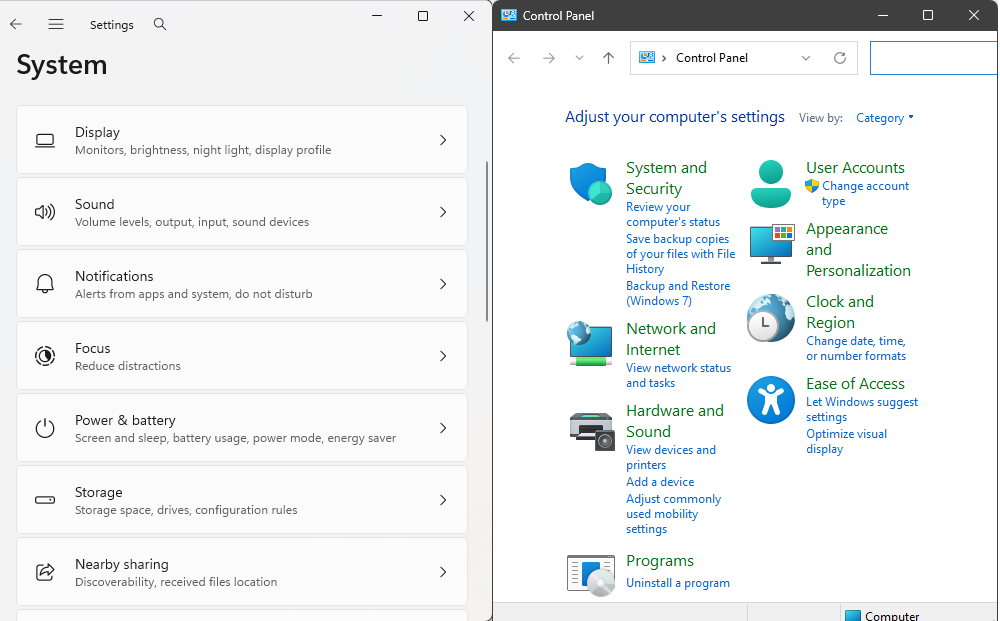
Heres an example of the two settings menus existing in Windows 11. One of them hasn’t been updated since Windows 7, as you can plainly tell by the ‘Backup and Restore Windows 7’. Both are accessible from Windows 11,
winkey + rand typecontrolto open this old menu.
RegEdit
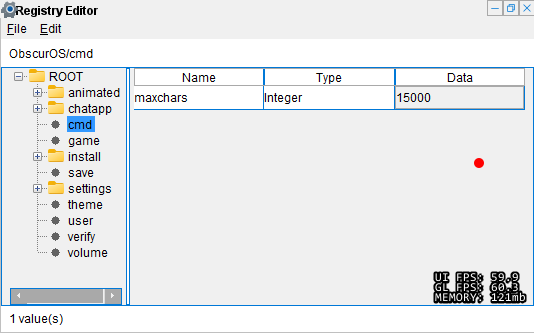
I’ve done my best to implement a Windows 7, or a Windows 10 design where it matters, and this includes the settings menu. I don’t want more than one settings menu, and I don’t want it complicated - regedit is for complicated edits, without restriction. I’ve added it and I think tinkering in there should be supported first class, it’s not part of the game directly, in the sense I don’t expect users to actually explore it and find it. But I’ve included it as part of the modding capabilities that I’ve been trying to encourage. I think if this is going to be a true simulation, it should have the capability and features of a real OS.
Notification Menu

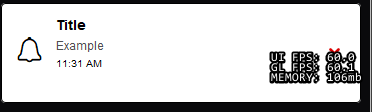
The notification menu is inspired by Windows 10, maybe Windows 8. I tried not to make it annoying, but notifications suck. So I expect the majority of users will turn them off at some point. I think notifications should be unique, and sent once. Who knows if it will end up being like that though.
In the OS, the differences from Windows only really become super obvious when you open the terminal - for the most part it feels like a Windows OS. But the terminal like I mentioned yesterday, is entirely inspired from the Unix / Linux command line.
Dec 5th - Terminal & CMDBox
I’ve been working on a terminal easter egg since I started reworking the command line into a more realistic simulation. Part of this easter egg involves adding features that power users would expect, and most users wouldn’t know existed unless following instructions written by those power users.
Part of this expansion has been me trying to ramp up the realism. I think the command line should be realistic, and work like a normal command line would. There are a handful of changes where we differ from Windows and Linux / Unix, but for the most part I’ve tried hard to support both sides when possible. I lean on the Unix side a lot more, because some of the conventions line up with what I agree with. Those that don’t, I’ve skipped.
As part of an effort to help ramp up realism, I’ve added the the Debug on flag. This flag works like the Echo on flag does, and the Color on flag.
Debug on
This command enables the full command shell pipe output to be visible for debugging. Since the output of one command acts as the input for another, this is useful for debugging commands that failed for no explicit reason.
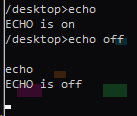
Echo on
Echo on behaves differently from the traditional operating system implementation: it toggles whether the command prompt input indicator is displayed when waiting for user input.
Color on
This command enables colors in the terminal by using IRC-like escape sequences:
The following code:
color on
echo "\003#00FF00,#202020Green on dark gray background"
echo "\003#FF5733Orange \00312Blue \003#8E44ADPurple \0034Red\017 Normal"
echo "\002\003#FF0000Bold red \003#0000FFBold blue\002 Normal"
Produces the following styling effects:

Lua
Lua can take advantage of all of this coloring functionality by interacting with the terminal through the API by toggling color mode on, then printing using the escape sequences:
setColorMode(true)
print("\002Bold text\017 Normal text")
print("\031Underlined text\017 Normal text")
print("\029Italic text\017 Normal text")
print("\0034\002Bold red text\017 Normal text")
print("\0034,8\002\031Bold & Underlined Red on Yellow\017 Normal text")
print("\0034Red \00312Blue \0039Green\017 Normal text")
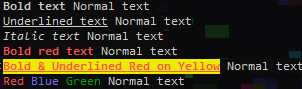
I’ve based the escape sequences off of IRC color escape sequences, instead of using a predefined palette I’ve extended them to also support hex color codes.
Dec 7th - Bug Fixes & More
After I spent the past week losing my mind to the command line, I woke up today wanting to continue working on fixing bugs, but focus on the UX.
Part of todays expansion has been tackling the last of the context menu, finishing up stuff that should have been done months ago.
Open In Host PC

This is a concept I thought of today, I was annoyed that I couldn’t just open the explorer location that I’m viewing, in my actual Windows File Explorer. I figured other users would experience the same frustration - why not make it as easy as possible.
I figure the barrier of entry for modding should be minimal. If a user wants to access their files, I think I should let them.
File System Access Levels
Part of the UX changes have been limiting what folders the user has access to. I created a system with 3 modes of operation, depending on what the code is trying to do / access.
Basic Access
The most basic form of file access - this only allows /desktop/ and /documents/ to be accessible. Two folders that are used for user data, this is data that can be freely deleted and the OS will experience no issues. (Technically, if the user creates any folder in their save data folder, it will count here, but I assume most users won’t be doing that)
/ (Root)
└── Desktop/
    ├── my_file.txt
│   └── my_music.wav
Intermediate Access
This access allows all relative paths to work, but not all absolute paths. In a nutshell this means you cannot access /packs/ or /themes/ - but you can if they are loaded in as a relative path, such as being in /icons.
/ (Root)
├── Desktop/
│   ├── my_file.txt
│   └── my_music.wav
└── Fonts/
    ├── bold.ttf
    ├── bold_italic.ttf
    ├── ...
Expert Access
This allows for almost complete unrestricted access, there are a handful of locations you cannot touch still /save, /recyclebin & /hidden. But beyond that you are free to access every single file, and folder, the game has to offer. This includes paths such as /themes/theme-name/icons.
/ (Root)
├── Desktop/
│   ├── my_file.txt
│   └── my_music.wav
├── Fonts/ <-- points to same file as theme fonts
│   ├── bold.ttf
│   ├── bold_italic.ttf
    ├── ...
└── Themes/
    └── 1337/
        └── Fonts/
            ├── bold.ttf
            ├── bold_italic.ttf
            ├── ...
Dec 9th - Unit Testing
I’ve been able to create unit tests for a handful of applications, the hardest part has been communicating with the actual program to know if the test was successful or not. Still trying to get a clean solution for that. It’s different per program, so some things I just simply won’t be able to test I assume. But some testing is better than no testing!
All of these tests exist within the developer source code only, but I would like to add some kind of secondary test in the future that allows me to test the production release. I think testing the release binary would provide more of a benefit than just focusing on the source code itself.
I’ve been thinking for a better solution, and I think the easiest way is going to just be some kind of macro style system where I literally just launch the programs one by one - and manually move the mouse to where the known location would be for whatever I need to test.
There are a lot of pitfalls to blindly testing like this, so we’ll see how reliable this will end up being. But I think it will work. I’ve done some basic tests so far and from what I can gather, it’s going to be a pain to write, but in the end I’ll be able to reproduce testing everything that I’ve been manually testing this entire time. Which will be a nice relief to know I’ve got an extra set of eyes helping me test everything.
Dec 10th - Macro Testing
I’ve decided to try writing the macro testing system today, moving from unit testing during build. To instead testing everything at the very end - after the entire process has finished building.
I’ve thought it over and I figure that it’s better long term solution, then I get the benefit of testing it in the real conditions the users will.
So far, for the two programs I’ve added testing for - I’ve already found two bugs. So I’m sure I’ll continue to find more.
The repeatable conditions so much easier to test and fix bugs, this acts as a fail-safe. If I introduce an update, and it breaks stuff - I know instantly. Then I can simply identify the bug based on what changed since the last test ran successfully.
Part of the testing inspiration comes from stories I’ve heard from ex-developers at Microsoft. They have an entire farm of over 6,000 computers dedicated to testing various tasks within Windows. When a new release is ready for testing, it has to pass the gauntlet of surviving the farm tests. Knocking down bug after bug, trying to prevent developers from breaking existing applications.
The downside to this kind of testing - you must always keep it up to date, and if you do any major UX overhauls, all your tests may be invalid depending how they are written. Also, automated testing can only cover a fraction of the conditions an OS gets into, but it’s better than nothing.
Dec 11th - On Screen Narration
On screen narration is another concept I never thought I would actually add. Mostly due to the fact that it’s entirely out of scope, and I assumed I would have to interact with some 3rd party software like screen readers.
While I was writing the Macro Testing test suite, I ended up coming up with a solution for on screen narration. At least the part of extracting text from where your mouse is hovered over. It’s more of a novel concept than anything, but I figured I would try adding it.
In the middle of finishing up writing the narration I realized this could be used for as the base for an ‘inspect element’ style debugger. It wouldn’t serve any real purpose, but I’ve been using it for fun as a quick renaming tool. It lets any text on the screen be changed, which is pretty cool.
Inspect Element
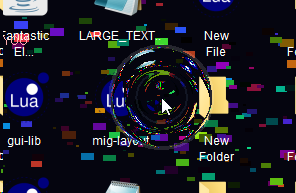
I’ve been working on a lot of these kind of tools, mostly for fun. I’m trying to pack the OS with as many goodies as I can, so there is lots to explore. I’ve got a few ideas I’d still like to add in, like mouse effects.
I’ve been experimenting with a handful of mouse effects that I think should work without any performance impact, but we’ll see.
Mouse Effects
Dec 12th - Commit History
I thought it would be fun to see how many commits I’ve done to the project. In 4 days it will be 1 year since I created the project Git history.
git rev-list --count HEAD
2684
That is 2,684 times I’ve saved my work, and backed it up, in the hopes that I can revert it in the future. I think it loosely acts as a way of measuring my progress. Keeping in mind that this doesn’t show how much code is submitted. For example, because I could work for for 2 days, and only commit once. I try to avoid that, but in the moment, it happens.
Dec 13th - Debug Mode
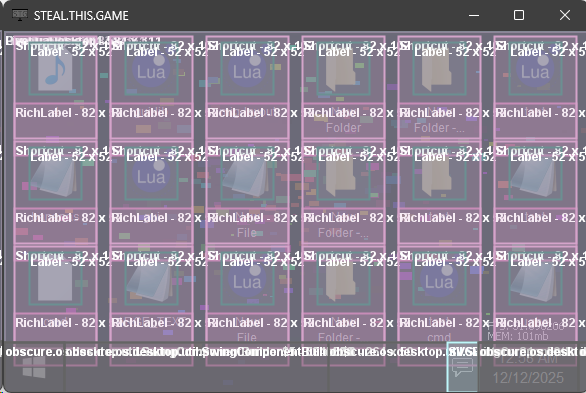
While I was working on the overlay code for the click effects, I thought of a better way to render the debug mode, and came up with this solution. I think it could be cool to keep in as a developer only flag, and add some kind of command line access to enable it.
Right now as it stands, it destroys performance, and is almost unusable because it renders objects under other objects, so if you have two windows open it’s really hard to understand what’s going on. But I think it’s cool, so I wrote it.
Debugging Mode
Dec 14th - Blue Light Filter
Another idea I had, for system wide overlays, is to make a blue light filter. My favorite one has to be F.LUX, so I thought I would try remaking it.
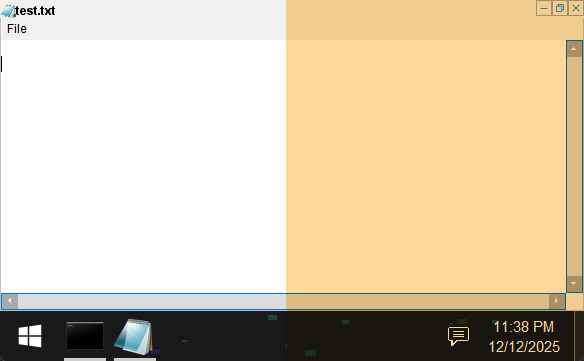
My first thought, was simply draw a semi-transparent orange rectangle. Naively I assumed this could work.
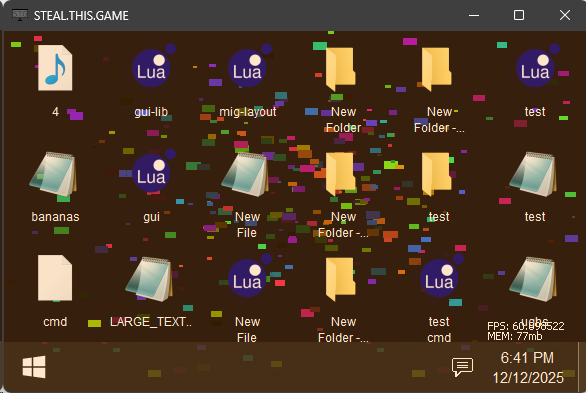
As you can plainly see - this has some massive pitfalls. The dark colors - black, dark grey, etc - become brown. Rather than using a smart, targeted, way of swapping the colors, this blindly malforms the entire display. Not good.
The real solution is instead of just drawing on top of every pixel - changes the color of the Blue value in the RGB pixel. Dimming the blue pixels roughly 40% of their original intensity.
This targeted change to the blue pixels only is what produces an acceptable output for the blue light filter.
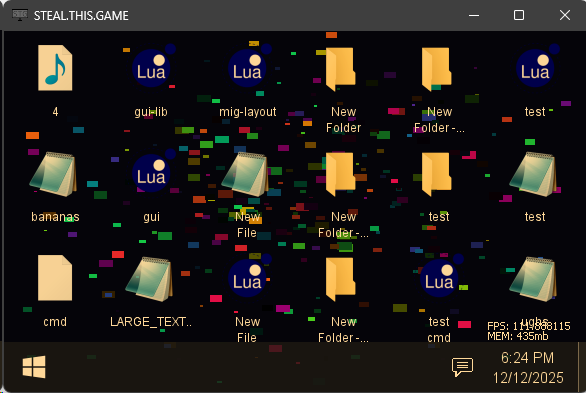
The results are more than good enough, I think its working exactly as intended, and now I can move onto other things.
Or so I thought, sadly my implementation, at 1920x1080 was hovering at around 30 FPS. Completely unacceptable - as my minimum target FPS goal is 60.
I decided to see if I could really push this to the limit.
I was able to access some low level APIs - code that was never intended to be used, but still existed, which meant I could access it. I had to really hack it apart to make this work.
Using that hacky code, I was able to get the pixel by pixel implementation working by forcing rendering in a specific way. I think this might be a solution I can use when I want to enable the GPU OS render mode, solving the FPS issue with that system.
There are a few pitfalls with this implementation, such as random FPS drops at times, from 60 down to 45-55. But that’s better than 30 FPS steady.
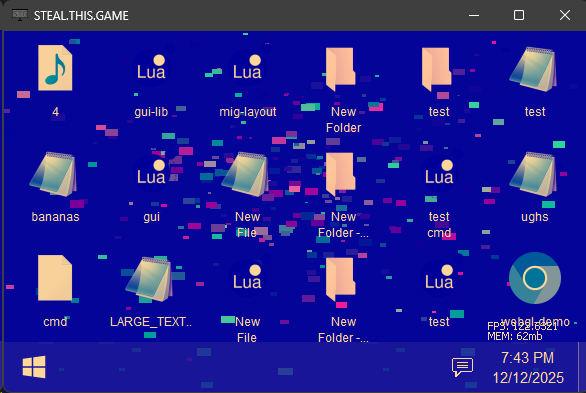
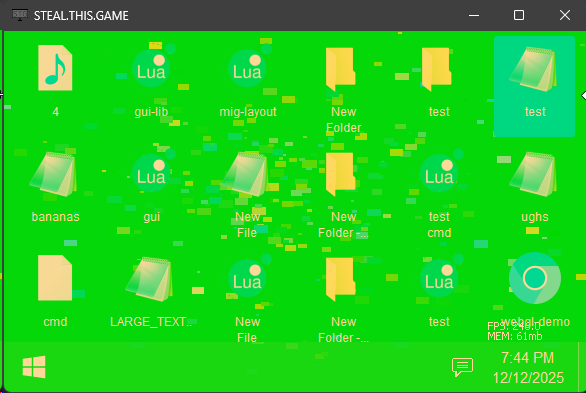
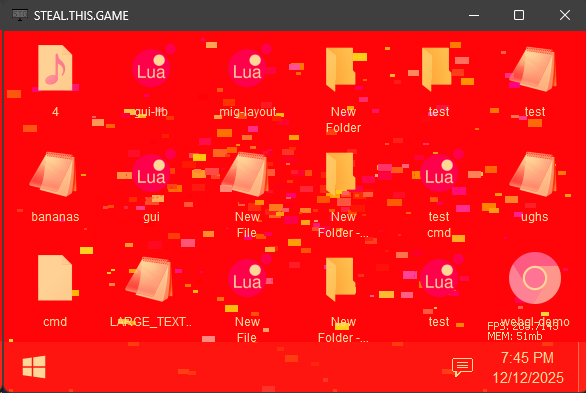
Here are some pictures I took while I was experimenting with the look up table code, I might introduce some of these effects in the future. The colors can be controlled real time, so it could make for some interesting cinematic scenes in the future.
Blue Additive Color Blending
Green Additive Color Blending
Red Additive Color Blending
Final Blue Light Filter Result
On the left there is no filter active, on the right it’s activated.
I’d say that’s pretty close enough to a decent blue light filter. It’s missing a handful of things, and there are improvements I want to add in the future, like adjusting the intensity levels - but it’s a good start towards accessibility.
Dec 15th - Previous Operating System Attempt
Before I started working on this game, I actually had another prototype operating system I was working on.
It was an oldschool 1980s style terminal, with graphical sprite rendering mode. It was an emulation, so it had it’s own virtualized CPU, RAM, sound chip, GPU, etc.
To keep things simple, the CPU opcodes also contained the draw and audio functions, so it was meant to be like Pico-8 in that regard.
My loose idea, is I would have my terminal style game, and it would be fully programmable. You would be able to load your own programs, and they would run, just like a Commodore 64.
There was no concept of multi-process, so you would run one game at a time, full screened. You could even overload the ‘reserved’ memory where the OS lived if you wanted. Forcing a reload from disk if you wanted to open the core OS again. Everything lived in memory, and there was no direct concept of resources besides what was packed in the program.
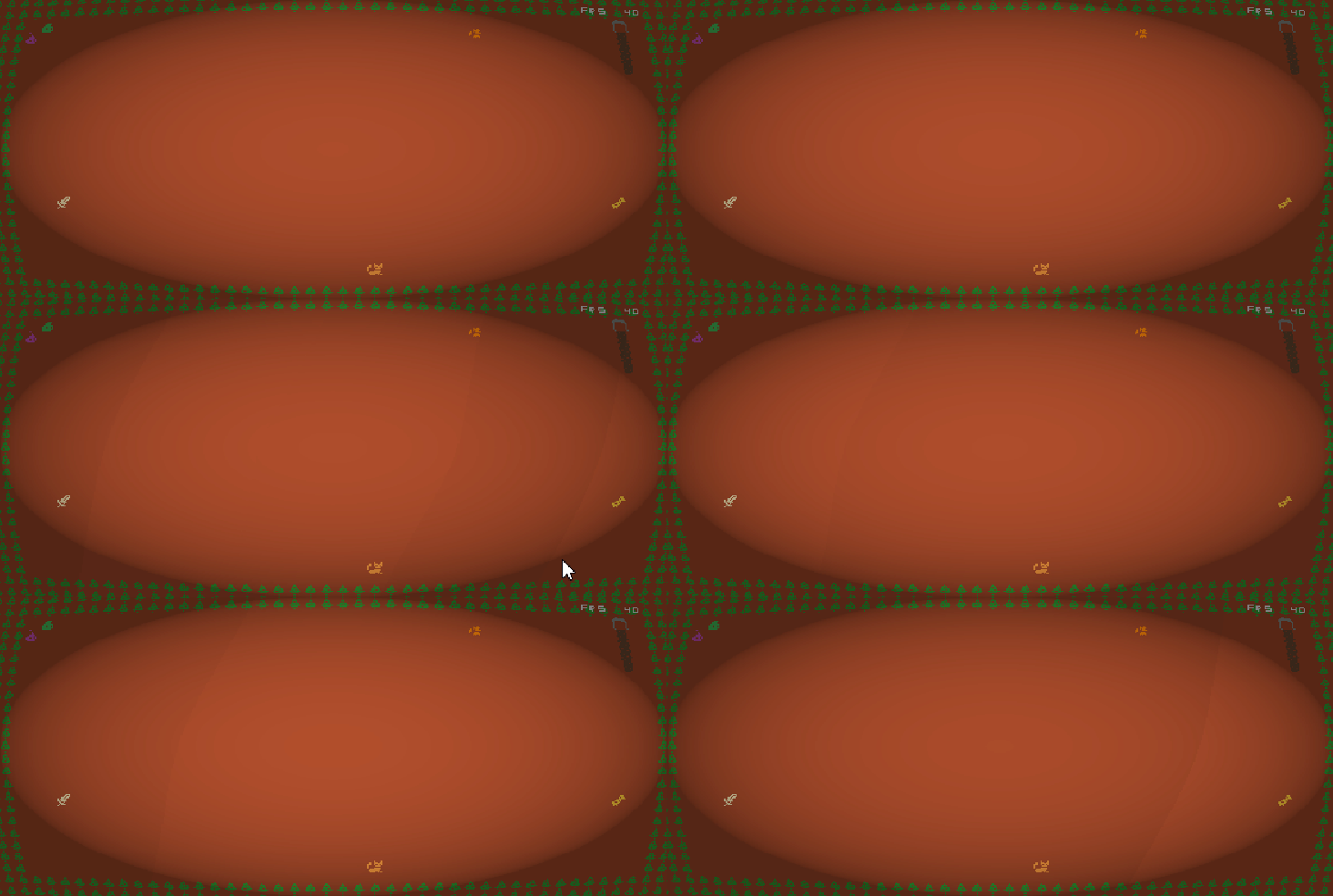
I got pretty far into the development process. For games I even had Tile2D loading with basic map exploration. It wasn’t anything complex but this game was a few weeks worth of work combined. I even had written CPU bound image filters that acted loosely like shaders did - malforming the screen to simulate a CRT style look.
2D Game With CRT Look
The reason I abandoned the concept, is because I felt it was a great proof of concept, but it was tackling the wrong problem. I love the idea of a fully simulated, programmable system. Pico-8, Notch’s 0x10c, these are examples of systems that have virtual CPUs that can run actual programs. For some reason, that resonates with me, I love the idea of having a low level system be able to run code that I wrote.
I wanted to create something similar to those virtual systems - I felt I could learn from the various eso langs, and from the various virtual systems that have been released. I figured I could learn from there mistakes, and successes, to create something really cool.
OS Road Blocks
Here are the road blocks I ran into, which forced me to re-evaluate the concept entirely:
- A low level binary format should have a compiler, something that takes a higher level language and compiles it down to the low level binary - now you are maintaining a compiler.
- A compiler, needs a language, now you are maintaining a language.
- Debugging is only as easy as your debugger.
- To make your life easier, you should also make a decompiler. Or at least that was the excuse for why I made mine - don’t worry it only showed the assembly, not the actual source code. I’m not a madman who could pull off an entire decompiler, just enough to get an idea where my compiler broke.
- A low level, fully simulated system, needs to have the entire OS simulated.
- I wasn’t cutting any corners with this project, I wanted users to be able to rewrite the core of the OS if they wanted. Think Pico-8.
- Functionality for me, was going to be inspired from the Apple II, commodore 64, and other various computers from that era. The idea is you would be given a terminal, that can run BASIC - and from there you would type commands to load various programs into memory.
- This is unacceptable in 2025 - expecting gamers to learn esoteric commands, just to load a game is dumb. I probably would have caved instantly, and made a GUI. I program every day, I don’t want to type commands more than I have to.
- Limits with the upper bounds of how fast I could realistically pull off a VM inside of my own code. I was getting some good speeds, good enough for most programs - but every single time I was writing a demo, or a game in this framework, I realized I was fighting an uphill battle.
- Essentially, because I was interpreting the language, I was doing maybe 4 or 8 times the amount of work. Normally a program would be running x86 opcodes directly on your CPU, or it would be JIT translated from bytecode to do so. I was running these opcodes within the higher level stack, which meant none of the opcodes got translated directly to x86 CPU opcodes. Instead it was running entire functions, filled with opcodes to pull off what could have been a single opcode. For most games / programs this is a non-issue. But I couldn’t shake that feeling of artificial performance limitation.
- It was an absolute BEAST of a resource hog. Using two threads 24/7 with no mercy it would go crazy trying to render everything on the CPU.
- This was more of a me problem, my VM was obviously far from optimized, and I was more focused on the visual side than optimizing it at the time.
- At the end of the day, it wasn’t any better visually then just having the entire game written in a higher level language, the same one the game engine is written in.
- This is the reason that really pushed me to move onto other things.
Most of these issues came from the fact it was a CPU bound emulation, with it’s own custom language, compiler, and binary format. If I had implemented GPU rendering for the image buffer, and had GPU bound shaders instead of my CPU filters, the performance issues wouldn’t be a problem. But I would have been still stuck with all of the rest of the kludge that made this project really hard to justify.
I realized all of those problems were going to be an ongoing issue if I didn’t address them, and I really didn’t want to address them. It would have turned the project into something way different, and a lot less portable. And in the end, I liked the idea that these little binary programs could exist in other VMs made by other people. So I wanted to keep the scope small, these games should run comfortable on a CPU raster, or just using glyphs in a text buffer like I was doing.
Contrasting this against a higher level simulation, I felt like the low level simulation was just an uphill battle the entire time. In a higher level simulation, I’m using tools that are proven to work, and debugging is generally a breeze since the tools actually exist, and the support was built into the language directly.
My eso lang, compiler and debugger did not have that benefit. Instead they were all hand rolled which meant they were riddled with bugs. Instead of progressing with the games, or even the core OS to run them on, I was fixing the language I was using to write them in. It was a fun idea but the reality collapsed soon and I knew it would be a life long commitment of integration with the language itself.
- Comparing this to Lua where I had my first prototype up and running with 30 minutes, and I haven’t had to touch the language since. Debugging Lua is a breeze since cause it was built over the course of years by a team of developers.
Those are the main reasons why I ultimately decided to skip the low level emulation. One day I’d love to revive it, but it’s low on the priority list for me right now.
Dec 16th - Cell Simulation
Since I’ve been showing past projects that won’t see the light of day - I figured I’d show off one more. This is a project I’ve revisited several times since 2019, but at the core, it’s a cellular automaton simulation, but the ‘DNA’ of the cells is the code being interpreted. So it acts kind of like a game, but you can program the cells.
LI r0, 2
start:

// Check foe up
LI r1, 0
LI r2, -1
SENSE_FOE r3, r1, r2
JNZ bite, r3

// Check foe down
LI r1, 0
LI r2, 1
SENSE_FOE r3, r1, r2
JNZ bite, r3

// Check foe left
LI r1, -1
LI r2, 0
SENSE_FOE r3, r1, r2
JNZ bite, r3

// Check foe right
LI r1, 1
LI r2, 0
SENSE_FOE r3, r1, r2
JNZ bite, r3

// Follow signal
LI r1, 1"LI r2, 0"SENSE_SIGNAL r3, r1, r2"JNZ mv, r3
LI r1, 0"LI r2, 1"SENSE_SIGNAL r3, r1, r2"JNZ mv, r3
LI r1, -1"LI r2, 0"SENSE_SIGNAL r3, r1, r2"JNZ mv, r3
LI r1, 0"LI r2, -1"SENSE_SIGNAL r3, r1, r2"JNZ mv, r3

// Else random move
LI r9, 2
RAND r1, r9
RAND r2, r9
LI r7, 1
SUB r1, r1, r7
SUB r2, r2, r7
mv: MOVE r1, r2
JMP start
bite:
BITE r0, r1, r2

// Divide when possible
LI r9, 3
RAND r8, r9
JNZ start, r8
DIVIDE
JMP start
Cell Simulation First Look
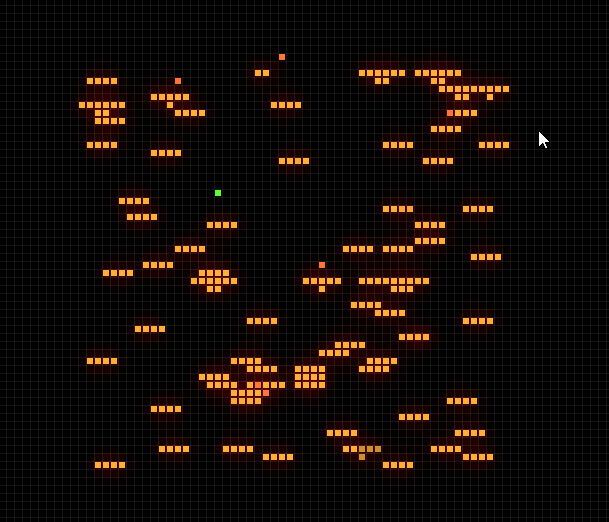
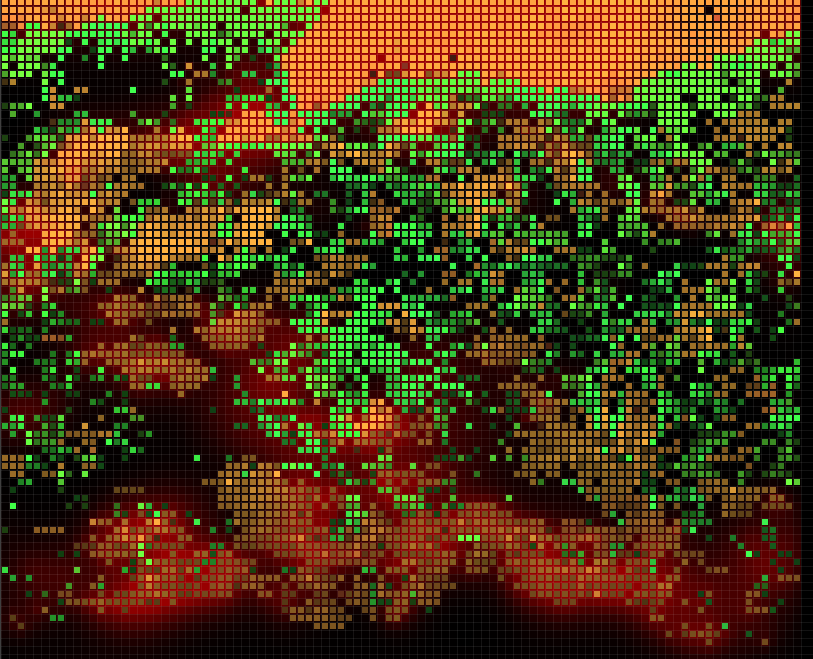
Energy exists and is gathered from the sun naturally, and from eating other life forms that contain energy (food).
The food life cells are just as programmable as the predator is. There are two types of food in that screen cap, but they can send signals to each other cause they are detect each other as friends still, and are compatible.
It’s a fun little game, but I don’t think it has a target audience in it’s current form. Maybe if I ditch the programming part, and make it interactive, it could be added in as an easter egg program into the OS.
Dec 17th - GitHub Woes
I loosely keep up with the tech world when I can. This project has allowed me to dive deep into my own technologies, so I haven’t been forced to be in the loop with a lot of the standards lately. But one piece of news that has been making the rounds, is GitHub is going to be making local GitHub action runners a paid feature.
I found that interesting, because I had left GitHub a few months ago, I wrote about it here, I ended up writing a GitHub action runners replacement, and I’ve been using it since. I thought at the time, doing this was a waste of my time, as the standard is to simply throw your project on GitHub - and use the runners on GitHub, or self host them to save money. This is a technology standard that used to be entirely free - now it’s becoming paid.
If I had built things differently, I would be looking at a cost now just to compile my code. That doesn’t sit right with me, especially if I would have been running everything locally, using my own bandwidth, my own energy and my own hardware.
The GitHub ecosystem is something I used to think of like a public library. It was something that you are free to take from (within reason) - but you should always make an effort to give back, in some form. Sadly, ever since Microsoft bought Github, the changes they continue to make, have me viewing it like a regular business, rather than a special place on the internet.
Dec 19th - Task Manager
Every good operating system needs a task manager. Dave Plumber infamously wrote Windows earliest version.
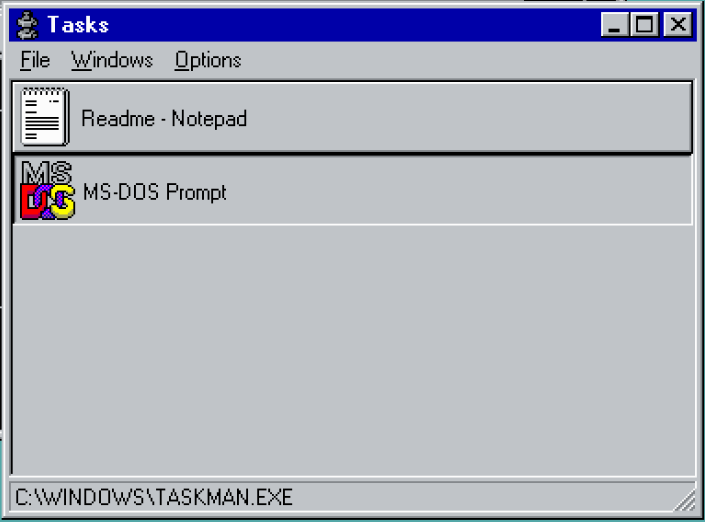
The original version that Dave authored is missing a lot of the bells and whistles we expect from a modern task manager - but it did set the expected tone the Windows task manager should follow for all future revisions.
William LeFebvre wrote the original top for Unix, and Roger Binns wrote the Linux port that I use on my Linux servers.

In true Linux fashion, it’s accessed entirely through the command line. Very useful for servers, but I prefer GUI for my desktop when it’s available.
Here’s my version of the Task Manager for my OS:
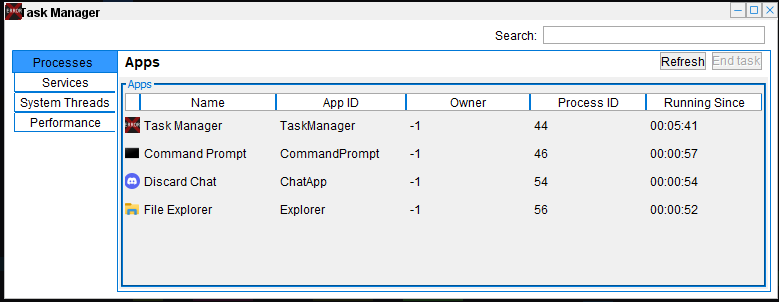
I based it off of the modern Windows version, at least as much as I could. There are a few corners I’ve had to cut, as I just don’t have the ability to monitor most things - such as CPU / memory usage per program.
Processes
The corner cutting boils down to the fact I simply don’t have traditional system processes. Instead, I have a loose internal convention that allows me to spin up pseudo processes. And those can be tracked, but due to the way I designed it, I allowed for extremely flexibility. This means GUI elements, tasks, and other process-like concepts can run without ever being labeled a process. I don’t think this is a major concern, I think it can be a strength at times, but it’s a direct consequence of my original design.
I’ve reserved the term program and process internally to mean any running applications that take up space in the task bar. GUI elements drawing on the screen are not considered a process, so the user won’t have the ability to terminate widgets on demand.
Tasks
Like I mentioned, background tasks and services, exist. These are entirely self managed, and I do not want anyone having the ability to terminate them on the spot. It will lead to an insane amount of unexpected bugs and behaviors - for that reason I’ve limited terminating to only be active programs.
System Threads
System threads, which power the task system and some other lower level things are viewable - but these also cannot be terminated. I’m not going to include system thread viewing in the final build, but it’s been fun experimenting with it while it’s active for now.
In the end though, the task manager ends up being more of a novel experience than an actual utility, but I think that’s part of what I’m building. The simulation should be real, but there is also an incredible amount of room for applications, tools, and other interfaces that can be added, just because they are fun.
Dec 20th - 3D Game Engine
I’ve finally decided I should also put some work into the 3D game engine while I’m doing all these back to back bug fixes. The operating system has been very easy to create, as I’ve had many years to think about the design in detail. The 3D game engine I’ve only tried once before to create, so I’m working off of those original designs.
The drag n drop functionality of the 3D game engine is close to being completed, but there are a lot of small bugs that add up. I’m going to go back and read my TODO dev notes eventually, but for now I’m just using the editor, noting down what I think is broken, then I fix it, if I can. (it’s important that I don’t save these notes, as I don’t want to duplicate my original TODO notes)
So far I’ve fixed a handful of bugs that have existed since I originally started the 3D game engine project. On the surface they were small, but they represented an itch that I’ve been longing to scratch. I feel pretty confident in the engine after having taken such a long break on it, I was able to easily figure things out, without much effort. In contrast to taking a long break from the OS - that is always a massive detriment as I end up having to figure out the gauntlet of a maze that are the operating system APIs.
Dec 21st - Git Hooks
Something I did not know about until today, is Git can run scripts at specific events. For example, when you add a file to Git, (that’s called commit). There is a Git Hook for pre-commit and post-commit - and this can be used to execute code when you add files into Git.
One example, I ran into an issue a few weeks ago when I was designing the website auto-build process.
It was working fine, but it had one fatal flaw - if I didn’t manually run my website/build script, I would end up invalidating the Git repo for the auto-build server.
- The build script formats my website files, so I need to ensure the files are already formatted when I add files to the repo, or the build server will format the files properly, overwriting the old ones.
And that process resulted in my build-servers repo constantly getting invalidated because I kept putting it into conditions it was never intended. The fix to this was obvious, any time I went to commit a file, it should just run the website formatter blindly. It takes a second to run, so there is minimal overhead.
I didn’t know if this was possible, and I really did not want to switch up my workflow. I love using Git how I use Git, and I think that reigns true for anyone who uses tooling daily. So I figured I would look up the obvious solution and google for the concept of Hooks / Events inside of Git. And to my surprise, the first thing that popped up was literally pointing me to ./git/hooks/ in my local game directory. This folder contains all of the hooks your Git project has access to.
And, thankfully, it includes some really nice examples:

Using the pre-commit.sample I was able to insert a call to the website formatting script into the pre-commit hook. This means whenever Git goes to commit a file, it’s going to run the formatter first.

Now whenever I write a blog post and throw in a bunch of images, I’m not going to accidentally take down the entire build server.
Dec 24th - System Overlays & Mouse Effects
I’ve been experimenting with system overlays to introduce mouse effects, and I can’t get enough of them. The effects add an entirely new dimension of intractability with the OS.
I have a few ideas for how these can be used and introduced - but I’m also going to include them as a system wide setting for those who enjoy these kind of wacky concepts.
Dec 30th - 2D Game Demos
Today is more experimenting, this time with some game demos, kind of like the old flash games on Newgrounds. Instead of being embedded in a website, these will be standalone applications that run inside of the operating system.
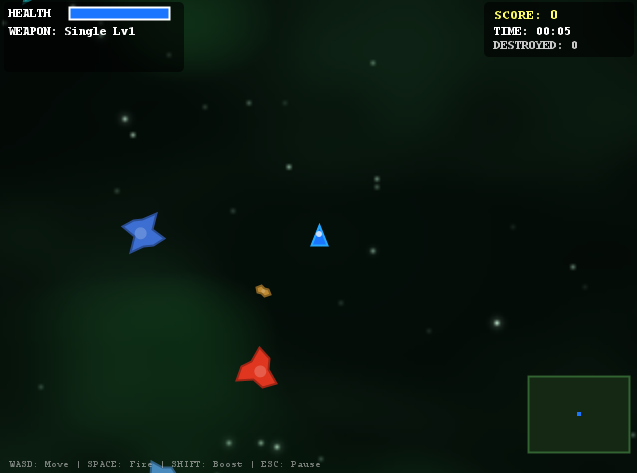
Asteroids Hell
Your basic asteroids game, with a twist - you control UFOs that can protect you from asteroid damage.
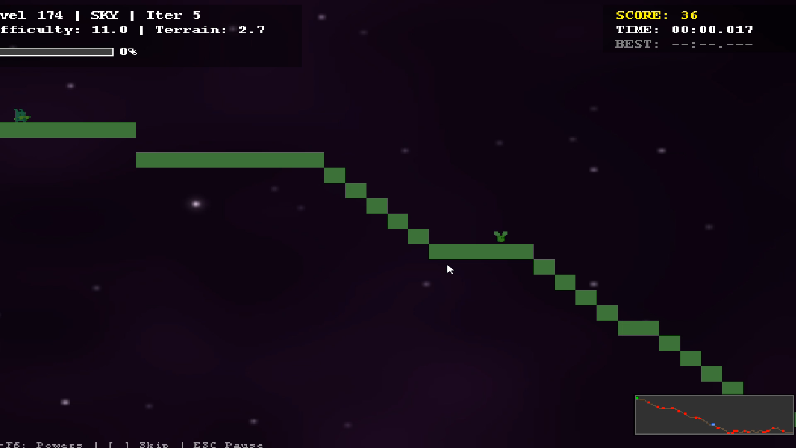
1,000 Faces
A never ending super mario clone with something weird happening on level 177.
My vision for the project is narrowing in - I’ve got a pretty solid concept for how the story mode and creative modes will work together, so I’ve just been trying to see what else I can fit in the project, without it being too out of scope.
My newest idea for the story, is to decouple it from a singular story mode concept. I’ve been playing Red Dead lately, and the random stranger encounters you get while exploring the world had me thinking - what if I did something similar.
Instead of having stories that intertwine, and are connected, what if the majority of the stories were all stand alone, and existed in their own pocket dimension - in a sense. Kind of like Black Mirror, or the Twilight Zone.
All of the stories would be self contained, with the main story given a conclusion, but the circumstances surrounding it could remain part of the mystery.
It’s pretty broad but the concept allows me to experiment with stories that I’ve cut out, and decided aren’t good enough for the main story. I think this could lead to some really cool content that would only be able to exist with this kind of free roam system.
Some stories could lead to continued missions, rather than just be one and done quests. There could be multiple quests in a row, or they could branch into other stories. Either way, at the core it lets me build entirely disconnected stories without having to worry too much about blending it into one cohesive system.
Dec 31st - Happy New Year
Happy New Year! Going into 2026, I’ve been thinking about the project - the scope of everything, and what my original plans were going into this project.
It’s been about 1 whole year since I started writing this game, working on it as a full blown project. December 16th, 2024 is when the Git repo for the untitled horror os game was started.
Originally, I was going to simply port over games I had made in 2018-2023. After I did that, I felt those games didn’t hold up like I thought they would, so I scrapped them. I figured I would create new ones, still 2D.
Then I started expanding on the operating system itself, and that slowly turned into its own game:
- Theming was added, then more complex theming, allowing for pictures to be drawn as borders, backgrounds, etc.
- Early on, while designing the 2D games, I kept thinking to myself that 2D wasn’t enough, and I wanted to see if I could get 3D working - once I did, I figured I couldn’t look back.
- Dynamic live wallpapers were included through the Live Lua update. This update paired with the themes creates an experience I never planned for when I started this project.
- I decided to lean into fun applications at this point, such as adding things that enhance the user experience, but aren’t useful outright: Paint image editor, Notepad text editor, etc.
- The system overlay code I just added this month came from an idea and an experiment to make it work, it was originally just the code for the FPS tracker.
All of these updates pushed my original target goal, which was a demo in 6 months, and release in 12 months - to be way off. I don’t have an exact timeline of when the game will be finished, but it’s definitely going to be far past the original deadline I set for myself.
I’ve been roughly 2-4x off my guesstimates for this project, so with that math I’m anywhere from 12-36 months away from full release. That sounds about right to me, but who knows how else I’ll pivot the scope down the road.
I’ve been trying to keep my vision for this project focused, so I don’t let feature creep bite me in the future. But honestly, the most important thing that I’ve done with this project has been allowing myself to pivot and experiment whenever something seemed like it could be an interesting experience.
I’m excited for 2026 and where this project is headed, I’ve got lots of plans for the new year and I can’t wait to write about them as they happen.